

Microsoft Copilot Free AI: क्या मिलता है, कैसे मिलता है और इसके Best Use Cases | 2025 में Complete Guide
अगर तुम सोचते हो कि Microsoft Copilot Free AI सिर्फ ChatGPT जैसा एक साधारण chatbot है, तो गलत हो। Microsoft इसे Windows, Office, Bing और Edge में deeply integrate कर चुका है — मतलब ये सिर्फ एक AI tool नहीं, पूरा ecosystem है.
इस blog में मैं तुम्हें साफ-साफ बताऊंगा —
✔ Copilot Free version में क्या-क्या मिलता है
✔ इसे कैसे activate और use करते हैं
✔ इसके real use cases
✔ Free vs Paid difference
✔ किसे Copilot इस्तेमाल करना चाहिए और किसे नहीं
✔ साथ ही SEO-friendly images prompts
यह blog Microsoft Copilot Free AI keyword को naturally target करता है.
Research students के लिए Perplexity AI ज्यादा accurate answers देता है, जबकि Google Gemini AI Google ecosystem के साथ बेहतर work करता है।
🔗 Links:
Microsoft Copilot Free AI क्या है? (Straight Truth)
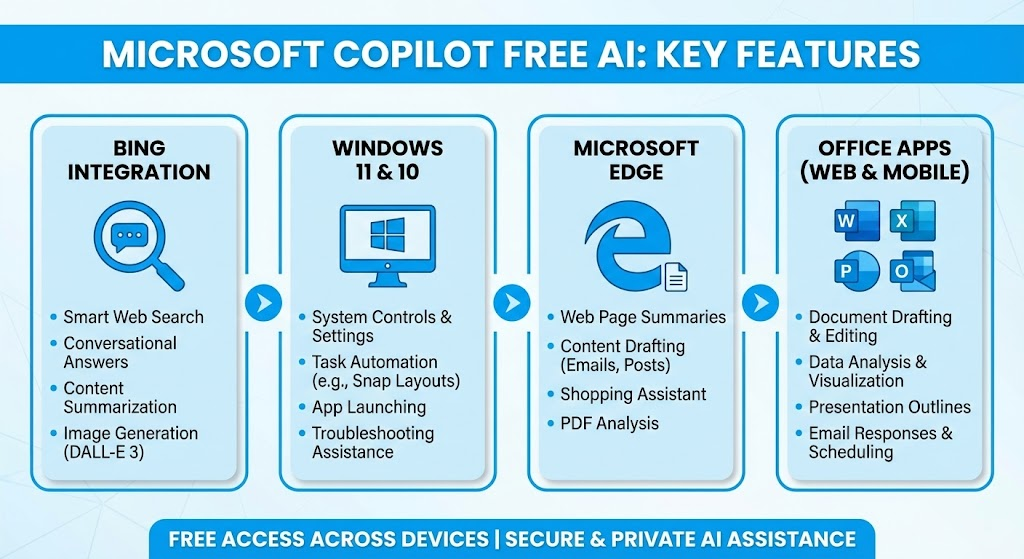
Microsoft Copilot Free AI, Microsoft द्वारा दिया गया एक free AI assistant है जो Bing, Windows 11, Edge browser, और कुछ Office apps में integrate होता है।
Free version में तुम्हें:
-
ChatGPT 4-quality responses (लेकिन downgraded और throttled)
-
Image generation (limited quality)
-
Writing, summarizing, coding help
-
Bing search-powered updated answers
-
Windows 11 shortcut + task assistant
ये सब मिल जाता है — free में.
लेकिन free version speed और accuracy में paid से पीछे है. यह तुम्हें पता होना चाहिए वरना unrealistic expectations बन जाती हैं।
Microsoft Copilot कैसे मिलता है? बिल्कुल Simple Guide
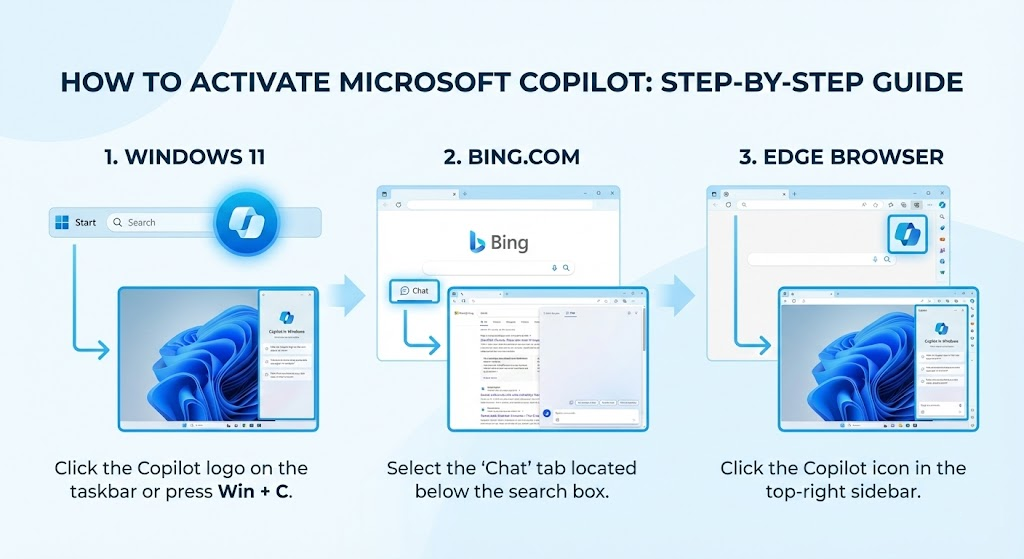
1. Windows 11 में
Windows 11 update के बाद Copilot taskbar में automatically आ जाता है।
अगर नहीं दिख रहा:
Settings → Personalization → Taskbar → Copilot ON
2. Bing.com पर
Browser खोलो → bing.com/chat
बस login कर लो Microsoft account से — free में चलने लगेगा.
3. Edge Browser में
Right side में Copilot का icon permanently pinned होता है।
Click → Chat शुरू।
4. Mobile पर
Google Play Store में “Copilot” app available है।
But ध्यान रखना: mobile app का free version काफी limited है।
Microsoft Copilot Free AI में क्या-क्या फीचर्स मिलते हैं?
नीचे साफ-साफ breakdown है — बिना sugarcoating के:
1. Writing & Blogging Tools
-
Blog लिखना
-
Email drafting
-
Social media content
-
Summaries
-
Grammar improvement
लेकिन सच यह है: free version की creativity paid Copilot Pro जितनी strong नहीं है।
2. Image Generation (Free DALL·E)
-
Basic level AI images
-
1024px quality
-
Limited prompts
-
Slow rendering
Quality ठीक-ठाक है, लेकिन premium tools जैसा output expect मत करो।
3. Coding Assistant
Copilot Free AI:
-
Code explain करता है
-
Bugs बताता है
-
Simple code generate करता है
But complex programming में free version fail हो जाता है.
4. AI Search Assistant
Bing search integration के कारण Copilot updated data दे देता है।
Google जितना accurate नहीं — लेकिन workable है।
5. Windows 11 Productivity Features
-
Apps open
-
Settings change
-
PC control
-
Quick answers
ये features सिर्फ Windows users के लिए useful हैं।
Microsoft Copilot Free AI के Best Use Cases (Realistic List)
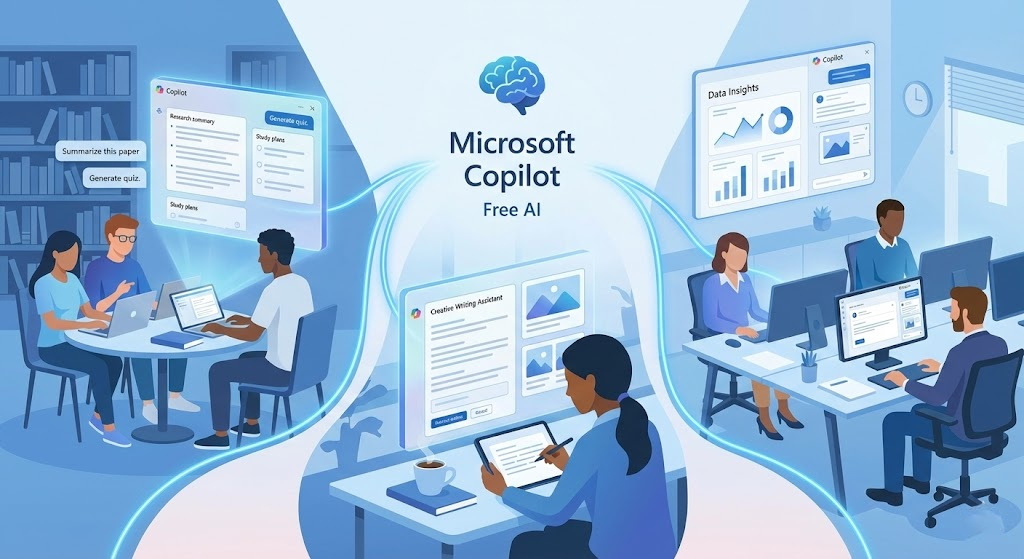
1. Students
-
Notes summarize
-
Assignments explain
-
Presentation content
-
Research help
Expectations realistic रखें — full assignment लिखवाने की कोशिश करोगे तो quality average मिलेगी।
2. Bloggers & YouTubers
-
Blog outlines
-
Thumbnail ideas
-
Keyword suggestions
-
Script points
लेकिन SEO accuracy के लिए खुद manual editing जरूरी है।
3. Office Work
-
Email drafting
-
Reports summarizing
-
Excel formulas (basic)
Advanced Excel automation → सिर्फ paid में useful है।
4. Small Business Owners
Free version में:
-
Content ideas
-
Customer replies
-
Product description
Business automation के लिए paid version ही सही choice है।
5. Casual Users
-
Chat
-
General knowledge
-
Small tasks
-
Daily productivity
Free version casual use के लिए बिल्कुल perfect है।
Microsoft Copilot Free vs Paid — Honest Comparison
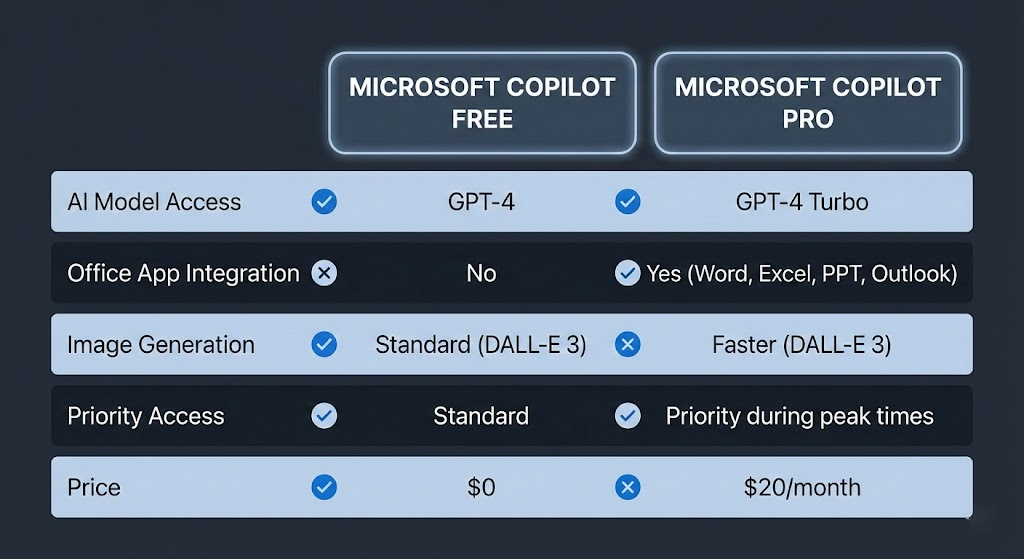
| Feature | Copilot Free AI | Copilot Pro |
|---|---|---|
| AI Model | GPT-4 downgraded | GPT-4 Turbo & latest |
| Speed | Slow | Fast |
| Image Quality | Basic | HD |
| Word & Excel Integration | Limited | Full power |
| Coding | Basic | Advanced |
| Price | ₹0 | ₹2,000–2,200/month |
अगर तुम professional हो — blogging, coding, business…
तो free version तुम्हारा काम पूरा नहीं करेगा।
But beginners के लिए काफी है।
Microsoft Copilot Free AI के फायदे (Pros)
-
Zero cost
-
Beginner-friendly
-
Microsoft ecosystem integration
-
Windows users के लिए helpful
-
Updated search results
इसके नुकसान (Cons)
-
Slow
-
Image quality medium
-
Limited features
-
Creativity कम
-
Office apps integration incomplete
Free version का real truth:
काम करता है, लेकिन professional level का output नहीं देता।
Microsoft Copilot Free AI कौन-कौन इस्तेमाल करे?
✔ Students
✔ Beginners content creators
✔ Casual users
✔ Windows 11 users
❌ लेकिन ये लोग free version से खुश नहीं होंगे:
– Serious bloggers
– Programmers
– Graphic designers
– Businesses